
Gas Bill Online Check by Name 2026 Complete Guide for Pakistan
Quick Answer:
SNGPL does not allow gas bill check by name or CNIC directly online bills can only be accessed using your consumer number. But if you do not have your consumer number, there are 6 working methods to find your bill right now. This guide covers all of them step by step.
Can You Check SNGPL Gas Bill by Name Online?
No SNGPL does not support gas bill checking by name, address, or CNIC directly through their online portal. Your bill can only be accessed using your 11-digit or 14-digit consumer number (also called Account ID or Customer ID).
This is confirmed across all official SNGPL platforms. The online bill check system at sngpl.com.pk requires your consumer number as the only search identifier.
But this does not mean you are stuck.
If you do not have your consumer number because your bill is lost, delayed, or you are a new tenant there are 6 working methods below to find your bill. Koi bhi method try karen aur apka bill mil jayega.
Method 1: Call SNGPL Helpline 1199 with Your Name and Address
This is the fastest method. Call 1199 from any Pakistani mobile or landline. The call is completely free.
What to tell the agent exactly:
- Your full name as registered with SNGPL
- Your complete address where the gas meter is installed
- Your CNIC number (agents sometimes use this for extra verification)
- Approximate year when the connection was installed if you know it
Call timings for faster response: Best time to call is between 9 AM and 12 PM on weekdays. Avoid Monday mornings as lines are busiest. After 2 PM wait times are usually shorter.
Practical tip: Agent se apna consumer number zaroor note kar len jab woh bata dein. Isko apne phone contacts mein save karen SNGPL Consumer Number ke naam se. Yeh future mein bahut kaam aata hai.
Method 2: Register on SNGPL Website Using Your CNIC
SNGPL’s online portal allows consumers to register an account using their CNIC number and service address. Once registered your consumer number and bill history become accessible.
Practical tip: Address bilkul wahi enter karen jo SNGPL ke records mein hai. Agar address match nahi kiya to registration fail ho sakti hai. Agar unsure hain to Method 1 try karen pehle 1199 se address confirm kar len.
Method 3: Find Consumer Number Through the Official SNGPL App
The SNGPL mobile app available on Google Play Store allows registration using your CNIC number and mobile number linked to your gas account.
Step 6: Once logged in your consumer number, current bill amount, due date, and payment history all appear on your dashboard
If the app is not working or showing errors: Switch to Method 1 or Method 5. App technical issues are common calling 1199 is always more reliable when the app is down.
Practical tip: SNGPL app par CNIC se registration tab kaam karti hai jab aapka CNIC SNGPL ke records mein registered ho. Agar aap tenant hain aur connection owner ke naam par hai, app registration aapke CNIC se nahi chalegi. In that case use Method 5 office visit.
Also Read: SNGPL New Connection 2026 Complete Guide
Method 4 Check Old SMS, Email, or WhatsApp for Consumer Number
Before spending time calling or visiting an office, check these quick sources first. Many people find their consumer number within 2 minutes using this method.
Check your SMS inbox: Search for “SNGPL” or “1199” or “gas bill” in your message inbox. SNGPL sends SMS alerts when new bills are generated. These messages almost always include your consumer number.
Check your email inbox: Search for “SNGPL” or “Sui Gas” or “gas bill” in your Gmail, Yahoo, or Outlook inbox. If you ever signed up for email alerts your consumer number will be in those emails.
Check your WhatsApp: Many Pakistani families photograph their gas bills and share them on family WhatsApp groups. Search “SNGPL” or ask family members to check old photos in your family group. The consumer number is printed clearly on every gas bill.
Check old bank or JazzCash payment receipts: If you ever paid your gas bill through JazzCash, Easypaisa, or bank app, check your transaction history. Payment receipts usually show the consumer number used for that payment.
Practical tip: Yeh method 2 minute mein kaam kar sakta hai. Pehle inbox zaroor check karen. Zyada tar log consumer number phone mein hi kahin na kahin save hota hai bas yaad nahi hota.
Method 5 Visit Nearest SNGPL Office with Your CNIC
If all digital methods fail, a single office visit solves everything immediately.
What to bring:
- Original CNIC zaroor leke jayen
- Photocopy of CNIC
- Proof of address if available rental agreement, property documents, or utility letter
At the SNGPL Customer Facilitation Center (CFC):
Go to the customer service counter and tell the staff you need your consumer number. Give them your CNIC number and address. They will search the internal system and give you your consumer number, current bill amount, due date, and any outstanding arrears immediately.
You can also request a printed copy of your latest bill at the office if you need it urgently for payment.
Find your nearest SNGPL office: SNGPL has offices in all major cities Lahore, Islamabad, Rawalpindi, Faisalabad, Multan, Gujranwala, Sialkot, Sargodha, Peshawar, Abbottabad, and more. Call 1199 to get the address of the nearest Customer Facilitation Center in your area.
Practical tip: Office mein jaane se pehle 1199 par call kar ke confirm karen ke office khula hai aur consumer services counter available hai. Yeh ek baar ka kaam hai jab consumer number mil jaye to phone mein save kar len hamesha ke liye.
Method 6 Use JazzCash or Easypaisa to Find Your Bill
Both JazzCash and Easypaisa allow gas bill payment by entering your consumer number. But they can also help you find your consumer number if you have paid through them before.
Through JazzCash
Open JazzCash app. Go to Activity or Transaction History. Look for any previous SNGPL gas bill payment. The consumer number used for that payment will be visible in the transaction details.
Through Easypais
Open Easypaisa app. Go to Transaction History. Find any previous gas bill payment. The consumer number will be listed in the payment details.
If you never paid through these apps:
JazzCash and Easypaisa also allow bill search through your registered mobile number in some cases. Open either app, go to Pay Bills then Gas, select SNGPL, and try entering your registered mobile number to see if the system pulls up your account.
Important: JazzCash aur Easypaisa ki yeh feature sirf un consumers ke liye kaam karti hai jinhone pehle in apps se bill pay kiya ho ya jinke contact number SNGPL records mein registered hon.
Where Exactly Is the Consumer Number on Your Gas Bill
Once you get your bill or find an old one your consumer number is in two places.
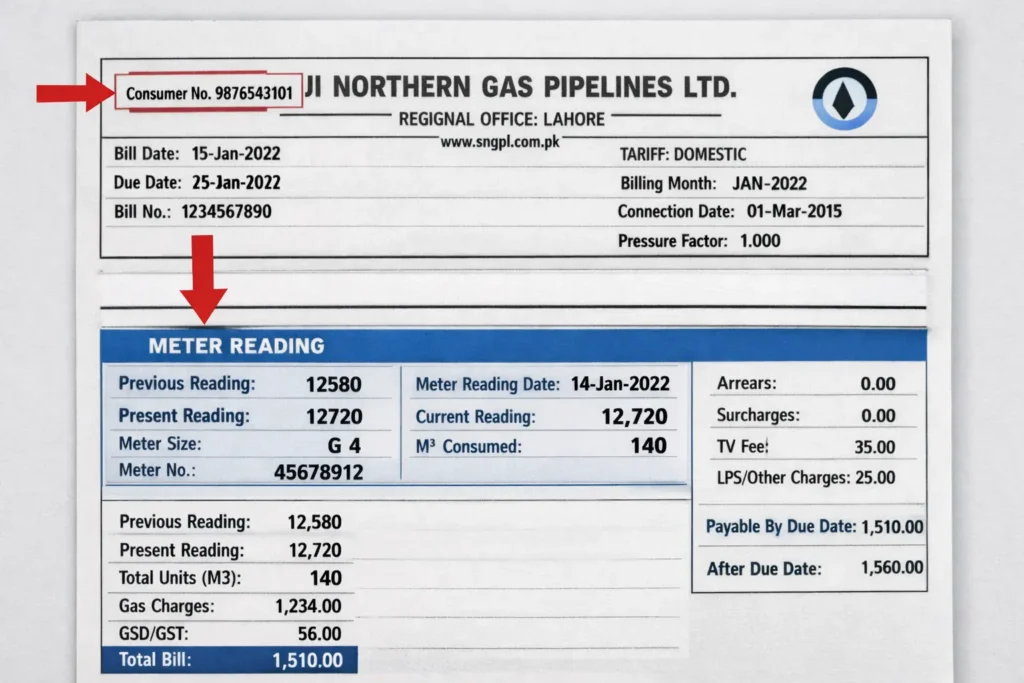
Location 1: Top left corner of the bill:
Just below the SNGPL logo and your address, you will see a box labeled “Consumer Number” or “Account ID”. This is the primary location.
Location 2: Meter reading section:
On the right side of the bill in the meter reading box, your consumer number appears again alongside your meter reading details.
What the consumer number looks like:
It is an 11-digit or 14-digit number. Example: 12345678901 or 12345678901234. It is not the same as your meter number. Do not confuse the two.
Save it immediately after finding it:
Add it to your phone contacts as “SNGPL Consumer Number: 12345678901”. This takes 10 seconds and saves you from going through this process ever again.
Special Guide for Tenants When You Don’t Have the Owner’s Consumer Number
This is one of the most common situations in Pakistan. Lets define it in easy way for you.
The problem: You are a tenant. The gas connection is in the landlord’s name. The landlord does not share the consumer number or the bill. You need to pay the bill or check it yourself.
Option 1: Ask landlord for consumer number directly
The simplest solution. Most landlords will share the consumer number when you explain you just want to pay the bill or check dues. It is in their interest that the bill gets paid.
Option 2: Call 1199 with address
Call SNGPL helpline 1199 and give your rental address. The agent can pull up the account linked to that address. You will get the consumer number even if you are not the registered account holder. The address is sufficient for lookup.
Option 3: Visit SNGPL office with rental agreement
Go to your nearest SNGPL Customer Facilitation Center. Bring your CNIC and rental agreement. Tell them you are a tenant and need the consumer number for the address. Staff will assist and can provide consumer details linked to your rental address.
Option 4 : Transfer connection to your name
If you are a long-term tenant SNGPL allows connection transfer to tenant’s name with a NOC from the landlord and an affidavit. This gives you full control. Contact SNGPL office for the transfer process.
Practical tip: Agar landlord consumer number share nahi kar raha aur bill unpaid hai, to yeh bhi aapki zimmedari hai kyunki disconnection aapke ghar mein hogi. Option 2 ya 3 use karen directly 1199 par call karen aur address de kar consumer number le len.
How to Never Lose Your Consumer Number Again
After finding your consumer number using any method above, do these three things immediately.
Save in phone contacts: Add a new contact named “SNGPL Gas Bill” and put your consumer number as the phone number. Whenever you need it it is always one tap away.
Subscribe to SNGPL SMS alerts: Visit sngpl.com.pk, go to Bill Notification section, register your mobile number and email. SNGPL will send you an SMS every time a new bill is generated. The SMS includes your consumer number, bill amount, and due date. Yeh subscribe karna bilkul free hai.
Take a photo of your bill: Every month when the paper bill arrives photograph it immediately and save it in a dedicated WhatsApp or phone album called “SNGPL Bills”. This creates a permanent backup.
Share with a family member: Send your consumer number to one trusted family member on WhatsApp. This way even if you lose your phone the consumer number is recoverable.
Conclusion
SNGPL does not support gas bill check by name but calling helpline 1199 with your address or visiting the SNGPL website to register with your CNIC are the two fastest ways to find your consumer number and access your bill within minutes. Once you have your consumer number save it in your phone immediately so you never need to go through this process again.
To check your bill instantly after getting your consumer number use the free tool on sngplbillcheck.pk enter your consumer number and your complete bill appears in seconds.
Frequently Asked Questions
Can I check my SNGPL gas bill by name online in Pakistan?
No. SNGPL’s online system does not support bill checking by name or CNIC. The only way to check your bill online is through your consumer number or Account ID. However you can find your consumer number by calling helpline 1199, registering on sngpl.com.pk with your CNIC, or visiting your nearest SNGPL office.
What if I forgot my SNGPL consumer number completely?
Call SNGPL helpline 1199 on any Pakistani mobile or landline the call is free. Give the agent your name, complete address, and CNIC number. They can locate your consumer number from the internal database and provide it to you immediately.
Can I check my gas bill using my CNIC number?
Not directly through the public bill check tool. However SNGPL’s website registration and the official SNGPL app allow you to link your account using your CNIC, after which you can access your bill. CNIC-based bill checking is also being gradually introduced for select users through the SNGPL app in 2026.
How do I find my consumer number if I never received a gas bill?
Call 1199 with your address, or visit your nearest SNGPL office with your CNIC. If the connection is new you should also check the connection documents given at the time of meter installation the consumer number is printed on those documents.
Is there any way to check gas bill by mobile number?
Not through the official SNGPL website. However JazzCash and Easypaisa may show your previous bill payments when you access the gas bill payment section using your registered mobile number. This can help you find your consumer number from old transactions.
How long does it take to get consumer number from 1199?
How long does it take to get consumer number from 1199?
The entire call typically takes 3 to 5 minutes. The agent looks up your account in real time during the call. Have your address and CNIC ready before calling to speed up the process.
Conclusion
SNGPL does not support gas bill check by name but calling helpline 1199 with your address or visiting the SNGPL website to register with your CNIC are the two fastest ways to find your consumer number and access your bill within minutes. Once you have your consumer number save it in your phone immediately so you never need to go through this process again.
To check your bill instantly after getting your consumer number use the free tool on sngplbillcheck.pk enter your consumer number and your complete bill appears in seconds.